Transferring Funds Across Spaces
ConfluxHub
The easiest way to transfer assets between Core Space and eSpace is to use ConfluxHub. We recommend that you set up two wallets: Fluent for Core Space and MetaMask for eSpace.
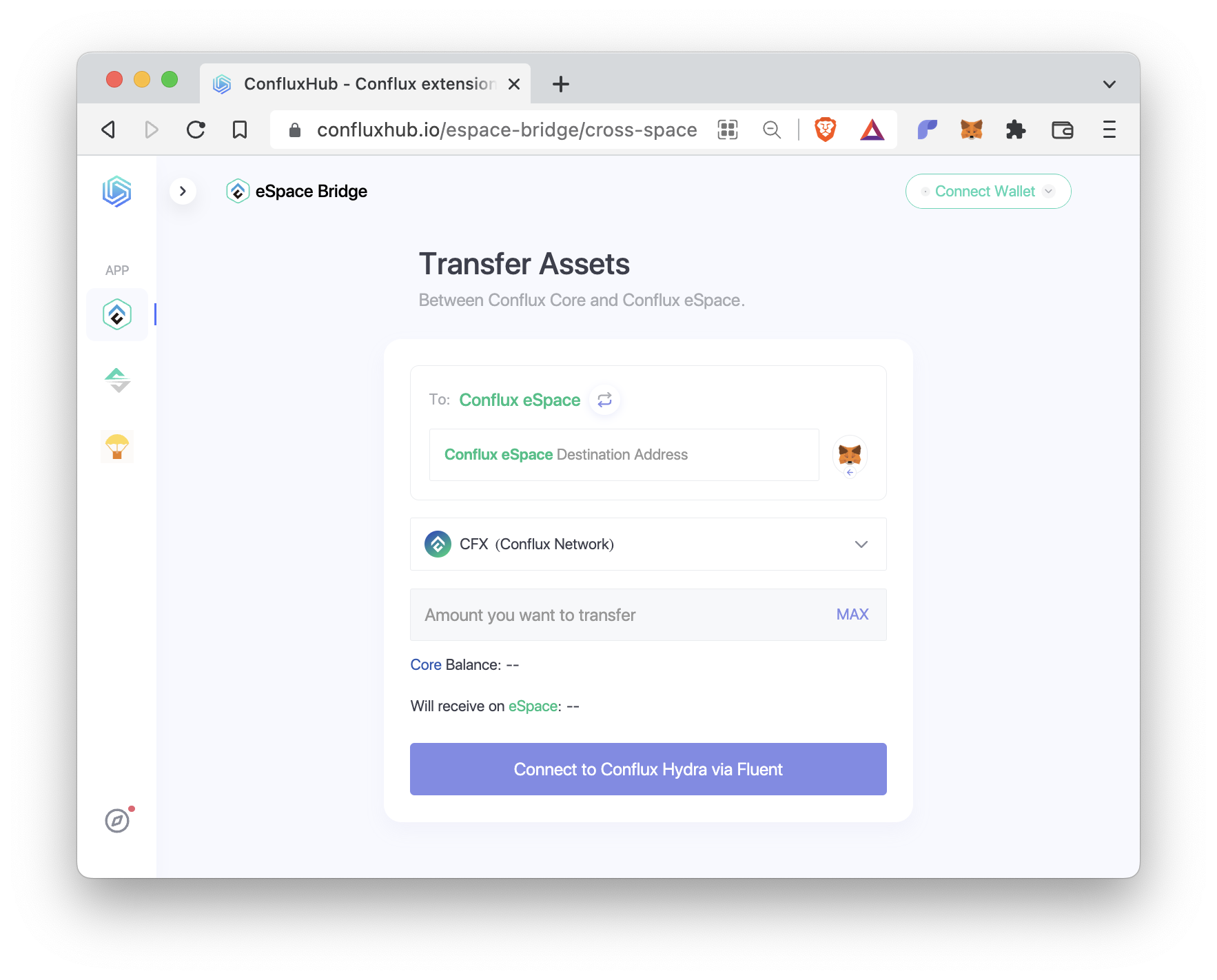
Follow these steps to make a cross-space transfer:
- Start by clicking on
Connect Walletto connect your Fluent and MetaMask wallets to ConfluxHub. To: Conflux eSpaceat the top shows that you are making a transfer from Core Space to eSpace. If you would like to make a transfer in the other direction, click on the arrow next to this text.- In the
Conflux eSpace Destination Addressfield, type in your eSpace address or click the MetaMask icon on the right to fill this field automatically. - Next, select the token that you want to transfer and enter the transfer amount.
- If the button on the bottom says
Approve, click on it to submit an ERC20 token approval first. - Once the button on the bottom says
Transfer, click on it to make the transfer.
Making a cross-space transfer from eSpace to Core Space follows a similar process but it has two main steps: First, transfer the token to the bridge on eSpace. Second, withdraw the token from the bridge on Core Space. Please follow the site’s instructions.
⚠️ When making a cross-space transfer, always double check your addresses to avoid accidental asset loss.